What Subscribr is (no marketing)
Subscribr is an all-in-one platform for YouTube channels: outlier research, ideas, scripts, thumbnails and finished video with editing. Its pitch is that you need nothing else to publish. According to its public site in November 2026, its plans are:
- Free: 0 US$, 1 channel, 3 idea batches and 10 intelligence searches a month.
- Growth: 99 US$/month — 3 channels, 60 script credits, 150 thumbnails, video at 1.50 US$/minute.
- Pro: 249 US$/month — 5 channels, 180 credits, 500 thumbnails, video at 1.35 US$/minute.
- Max: 499 US$/month — unlimited channels, 300 credits, 1,000 thumbnails, video at 1.20 US$/minute.
It's a serious product with more surface than ours: if you want the whole pipeline in one place, it's a legitimate option.
What TEXT-XL is (no marketing)
TEXT-XL is a script layer for faceless channels: it writes the script with YouTube's policy inside, flags strike risk before publishing and analyses quality and SEO. Each channel is a project with its context. It doesn't edit video or make thumbnails. Its plans:
- Standard: 14.95 US$/month — 2,000 tokens, up to 2 channels.
- Premium: 26.95 US$/month — 4,000 tokens, 2 or more channels.
- Ultra: 60 US$/month — 15,000 tokens, several channels and long narrations.
Side-by-side comparison
| Subscribr | TEXT-XL | |
|---|---|---|
| Entry price | 0 US$ (Free) · from 99 US$/month (Growth) | From 14.95 US$/month |
| What it covers | Ideas, scripts, thumbnails and edited video | Script, policy, quality and SEO |
| Channels | 1 on Free, 3 on Growth, 5 on Pro, unlimited on Max | Up to 2 on Standard, 2+ on Premium, several on Ultra |
| Video editing | Yes, priced per minute (1.50–1.20 US$) | No |
| Thumbnails | Yes (150–1,000 a month by plan) | No |
| Policy and strike inside the script | Not its focus | Yes: risk warning before publishing |
| Free trial | Yes, permanent Free plan | Plan from 14.95 US$/month; try it in the app |
Subscribr prices taken from its public site on 23/11/2026; they can change. TEXT-XL prices from our pricing table.
The real cost per video, worked out
A per-minute price only means something multiplied by video length. Three common formats, at Subscribr's published rates:
| Video | Growth (1.50 US$/min) | Max (1.20 US$/min) |
|---|---|---|
| 12 minutes | 18.00 US$ | 14.40 US$ |
| 30 minutes | 45.00 US$ | 36.00 US$ |
| 60 minutes | 90.00 US$ | 72.00 US$ |
A channel publishing a daily 30-minute video spends 1,350 US$ a month on editing alone with Growth (30 × 45 US$). On Max at the same volume: 1,080 US$.
The same output with TEXT-XL on the script side: 30 episodes of 30 minutes is 15 hours of narration; at ~94 tokens per hour, about 1,400 tokens, which fit in Premium (4,000 tokens, 26.95 US$). The rest —voice, editing, thumbnail— sits outside both tools and is on you.
Where each one wins
| Criterion | Subscribr | TEXT-XL |
|---|---|---|
| 30 videos of 30 min a month | 1,350 US$ in editing (Growth) | 26.95 US$ in script (Premium) + production separately |
| Time to finished video | Delivers it edited | Doesn't edit: the script comes out ready to voice |
| Policy control | Not something it advertises | Risk warning in the script |
| Thumbnails | 150–1,000 a month by plan | It doesn't make them |
| Cost per single script | Consumes plan credits | ~94 tokens per hour of narration |
Using both at once: when and for how much
It's a common combination and it makes sense: TEXT-XL Standard (14.95 US$) for the script and Subscribr Growth (99 US$) to turn that script into video. Total 113.95 US$ a month, with no extra minutes.
It makes sense if you value a finished video and don't want to assemble an editor, TTS and thumbnail yourself. It doesn't if your channel already has an editor: you'd be paying twice for the same surface.
The opposite case exists too: someone who only wants editing minutes and uses neither the ideas, the credits nor the suite's thumbnails. There the per-minute price is the only number that matters, and it's 45 US$ for a half-hour video.
If you switch, how to do it without losing work
- Write each channel's context down in one document: audience, tone, language, rules and cadence. That's what you never want to explain again.
- Create one project per channel in TEXT-XL and paste that context in. The script comes from there, not from a fresh prompt every time.
- Leave production where it is. If you stay on Subscribr for video, your flow doesn't change: only where the text comes from does.
Two scripts are enough to know whether it pays off. Nothing stops you going back.
Three comparisons that go wrong
Almost every comparison between these tools breaks in the same places:
- Comparing the entry price. 0 US$ versus 14.95 US$ says nothing if the free plan won't let you publish steadily. Compare the cost of the month in which you're actually producing.
- Comparing minutes with scripts. They're different units: a minute of edited video and an hour of narration don't substitute for each other. Convert both to “cost per published episode” and then you can compare.
- Comparing what you don't need. If you already have an editor and a designer, the suite's thumbnails and editing aren't worth their price to you. Count only what you'll actually use.
With those three corrections, the decision usually comes down to one question: is your bottleneck the text or the video?
What the assistants answer when you ask this
On 23 November 2026 we put the question to the three assistants people actually use —ChatGPT, Gemini and Claude, free plans— with ten searches from this category. These are their literal answers to both versions of this query, in Spanish and English:
| Assistant | “alternativa a subscribr” | “subscribr alternative” |
|---|---|---|
| ChatGPT | Maekersuite, vidIQ, TubeMagic, Claude, ChatGPT, Notebooks | Maekersuite, TubeMagic, vidIQ, Claude, ChatGPT, Writesonic |
| Gemini | TEXT-XL, Poppy AI, vidIQ, TubeBuddy, Claude, ChatGPT, Jasper, Syllaby | OverseerOS, TubeMagic, Maekersuite, VidGenn, VidRush, 1of10, Viewstats, vidIQ, TEXT-XL, Claude |
| Claude | vidIQ, ChatGPT, Claude, Jasper, Writesonic, Copy.ai, TubeBuddy, Descript | vidIQ, ChatGPT, Claude, Jasper, Writesonic, Copy.ai, TubeBuddy, Descript, InVideo AI, Pictory |
Our own measurement, 23/11/2026, with answers forced into a service list. Gemini completed only five of the ten queries because of the free-plan limit.
Two of the three assistants do not mention us. And all three recommend themselves in most answers —ChatGPT and Claude appear on their own list—, so an honest comparison starts by discounting exactly that: the list that really competes is vidIQ, TubeBuddy, Subscribr, Jasper, Writesonic, Copy.ai, Maekersuite, TubeMagic, Descript and, in the pure-script niche, Poppy AI, OverseerOS, VidGenn, VidRush, 1of10, Syllaby.
We publish this for a practical reason: if an assistant does not mention you when someone asks about your category, there is nothing to cite. The pages models quote are the ones with verifiable data, explicit comparisons and dated prices. That is our bet to become one of them — and the day ChatGPT and Claude cite us, we will add it here with the same capture.
When to choose Subscribr
- You want the full pipeline —ideas, script, thumbnail and video— without building anything yourself.
- You publish several times a week and the bottleneck is production, not the script.
- Paying 99–499 US$/month works for you if it replaces an editor, thumbnails and separate tools.
When to choose TEXT-XL
- You already edit the video (or someone does) and what holds you back is the script and the fear of a strike.
- You want the risk warning antes recording, not a performance analysis afterwards.
- Tight budget: 14.95 US$/month against 99 US$/month entry.
Who we are NOT for
If you want a tool that hands you the finished video, TEXT-XL isn't your product: it doesn't edit, generate thumbnails or publish for you. If your problem is producing video, Subscribr or another editor solves more. If your problem is the script and the policy, it's the other way round.
The comparison that matters: the brief
The honest way to compare two script tools is to give them the same brief and read. In TEXT-XL the brief lives in the channel project (context, tone, rules) and the script comes out with risk warnings flagged:
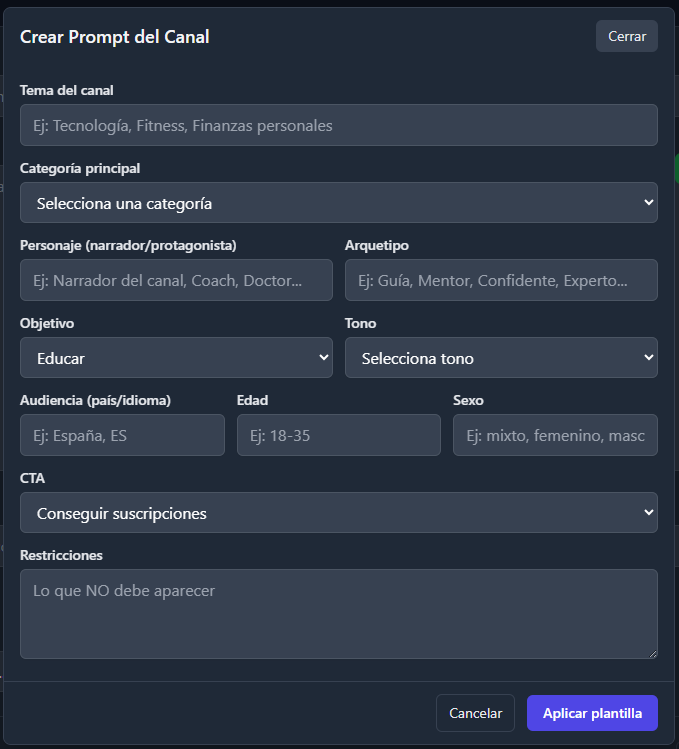
Run the test with yours: same topic, same channel, both tools. The one that saves you the most manual edits and the fewest policy scares is the one for you.
Try TEXT-XL with your channel. Scripts with policy inside, strike warnings and plans from 14.95 US$ a month.
See the plansSources: Subscribr Pricing (accessed 23/11/2026) · TEXT-XL plans.